Claude Code /loop and /batch commands, explained with examples
How to use Claude Code's /loop to rerun a prompt on a schedule and /batch to split a big change across parallel agents, with syntax, diagrams and examples.
Most Claude Code sessions are one task, start to finish. Two bundled commands break that pattern, in opposite directions.
/loop takes one prompt and runs it again and again over time: check
the deploy every five minutes, watch CI until it goes green, keep an eye on a
pull request. /batch takes one large change and runs it in many places at
once: it splits the work into independent pieces and hands each piece to
its own agent, in its own git worktree, in parallel.
This guide covers both: the syntax, what happens under the hood, the limits that catch people out, and how to choose between them.
The short version:
/loop 5m check the deployreruns a prompt every five minutes inside your current session./batch migrate src/ from JavaScript to TypeScriptplans the change as 5 to 30 independent units, waits for your approval, then runs one background agent per unit, each in an isolated worktree, and each opens its own pull request.
/loop vs /batch at a glance
/loop |
/batch |
|
|---|---|---|
| What it does | Repeats one prompt over time | Splits one change across many agents at once |
| Syntax | /loop [interval] [prompt] |
/batch <instruction> |
| Where the work runs | Your current session | Background subagents, one per unit |
| Isolation | None: same session, same files | A separate git worktree per unit |
| What you get back | A report in your session after every run | A pull request per unit, or a report |
| When it ends | You cancel it, the session exits, or it expires | When every unit has finished |
| Typical uses | Polling deploys and CI, watching a PR | Migrations, library swaps, repo-wide cleanups |
Both are bundled skills: they ship with Claude Code, so there's nothing to install. Like other skills, they're prompt-based. They give Claude detailed instructions and let it orchestrate the work with its normal tools. If either one is missing, update Claude Code:
claude --version   # this guide was checked against 2.1.331
claude update
What does /loop do in Claude Code?
/loop schedules a prompt to run repeatedly while your session is open. You
give it an interval and a prompt, Claude turns that into a schedule, and the
prompt runs every time it comes due. It's for anything you'd otherwise keep
checking by hand: is the deploy done, did CI pass, are there new review
comments? (/proactive is an alias for the same command.)
Four ways to start a loop
| You type | What happens |
|---|---|
/loop 5m check the deploy |
Runs on a fixed schedule, every 5 minutes |
/loop check the deploy |
Self-paced: Claude picks the wait before each run |
/loop |
Runs the built-in maintenance prompt, or your loop.md |
/loop 20m /review-pr 1234 |
Runs another skill on a schedule |
A few loops worth stealing:
/loop 5m check whether the staging deploy finished, and tell me if it failed
/loop 15m check PR #482 for new review comments and summarise them
/loop check whether CI passed and address any review comments
/loop 1h run the flaky test suite and append any failures to notes/flaky.md
Interval syntax: s, m, h and d
- Units:
sfor seconds,mfor minutes,hfor hours,dfor days. - One minute is the floor. The schedule is a cron expression, and cron works in whole minutes, so seconds are rounded up to the nearest minute.
- Odd intervals get rounded. An interval that doesn't map to a clean cron
step, such as
7mor90m, is rounded to the nearest one that does, and Claude tells you what it picked. - Lead or trail. The interval can come first as a bare token
(
/loop 30m check the build) or trail the prompt as a clause (/loop check the build every 2 hours).
Self-paced loops: leave the interval out
Without an interval, Claude decides how long to wait before each run, anywhere from one minute to one hour, and prints the delay and its reason. This suits work whose pace changes. A build that's nearly finished is worth checking again soon; a pull request that's waiting on a human reviewer isn't.
Self-paced loops can also end themselves. When the job is done, Claude can stop scheduling wakeups instead of polling forever.
Bare /loop and loop.md
Run /loop with no prompt (or with only an interval, like /loop 10m) and
Claude runs a built-in maintenance prompt. In order, it:
- continues any unfinished work;
- looks after the current branch's pull request: review comments, failed CI, merge conflicts;
- when nothing else is pending, runs cleanup passes such as bug hunts or simplification.
Before it pushes or deletes anything, each run goes through your session's normal permission checks.
To replace that routine with your own, write a loop.md file. Claude Code
looks in two places, and the project file wins if both exist:
.claude/loop.mdin the project~/.claude/loop.mdfor every project
<!-- .claude/loop.md -->
Look after the open pull request for this branch.

1. If CI failed, read the logs, fix the cause and push the fix.
2. Reply to new review comments. Make the change if the reviewer is right;
   explain why not if they aren't.
3. If CI is green and the PR is approved, say so and end the loop.

Never force-push. Never edit files under migrations/.
loop.md only replaces the prompt for a bare /loop. When you type a
prompt, the file is ignored. Edits apply from the next iteration, and
anything past 25,000 bytes is cut off.
Running a skill or slash command on a loop
Give /loop a slash command as its prompt and it runs that skill on every
iteration, as in /loop 20m /review-pr 1234. This works only for skills
Claude is allowed to invoke by itself. These reach Claude as plain text
instead of running:
- built-in commands such as
/permissions,/modeland/clear; - skills with
disable-model-invocation: truein their frontmatter, including the bundled/verify; - skills hidden by
skillOverridesor aSkilldeny rule; - MCP prompts such as
/mcp__github__list_prs.
How /loop works under the hood
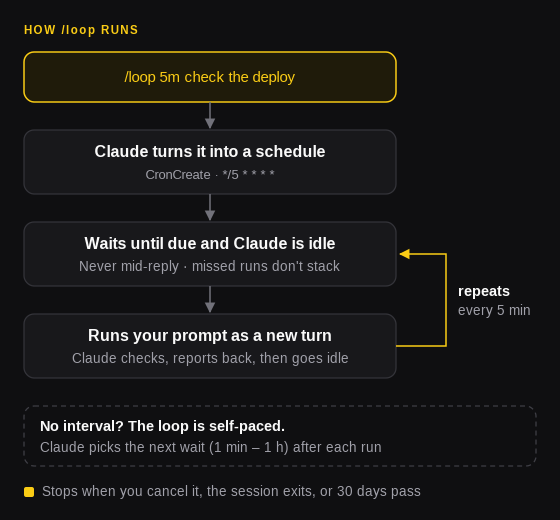
When you start a fixed-interval loop, Claude creates a scheduled task with
its CronCreate tool: a standard five-field cron expression, the prompt, and
whether the task repeats. /loop 5m becomes */5 * * * *. Self-paced loops
work differently: they use ScheduleWakeup to set one wakeup at a time, and
pick the next delay after each run.
Three behaviours explain most of what you'll see:
- Runs happen between turns. The scheduler checks every second for due tasks and queues them at low priority. A run never interrupts Claude mid-reply; it waits until the current turn ends.
- Missed runs don't pile up. If Claude is busy for 20 minutes during a five-minute loop, the task fires once when Claude is free, not four times.
- Times are local.
0 9 * * *means 9 a.m. in your timezone, not UTC.
Runs are also deliberately offset from the exact interval. Recurring tasks
start a little late, by up to half the gap to the next run and never more
than 30 minutes: a 10-minute loop runs 0 to 5 minutes late, an hourly one 0
to 30. The exception is /loop 5m, which runs 4 minutes 45 seconds after
the previous run. A run a full five minutes later would start after the
five-minute prompt cache had expired, so starting 15 seconds early keeps each
run on the cache.
How do I see and stop a running loop?
Ask in plain language. Claude uses its CronList and CronDelete tools
behind the scenes, and every task has an 8-character ID:
what scheduled tasks do I have?
cancel the deploy check loop
You can also open /tasks, which lists this session's scheduled tasks and
/loop wakeups (from version 2.1.329). Press x on one to stop it.
From the keyboard, it depends on the kind of loop:
- Fixed-interval loops ignore
EscandCtrl+C. Ask Claude to cancel them, or use/tasks. - Self-paced loops stop when you press
Escon an empty prompt while the loop is waiting, orCtrl+Cwhile Claude is idle. APending wakeup cancellednotice confirms it.
Limits: how long a loop lives, and what ends it
- 50 tasks per session. That's the most a session can hold at once.
- 30 days, then it ends. Since version 2.1.330, recurring tasks and loops run for up to 30 days while their session keeps running, and Claude Code tells you when one ends. Before that the limit was 7 days (the scheduled-tasks docs page still says 7), and tasks created on older versions still stop at 7. The limit exists so a forgotten loop can't run forever.
- Only while Claude Code is running. Tasks fire only while Claude Code
is running and idle. Close the terminal or exit the session and the loop
stops. To keep it going without a terminal, run
/background(alias/bg): the session detaches and keeps running as a background agent, loops included. Check on it withclaude agents. - Resume brings some of it back.
claude --resumeandclaude --continuerestore tasks created withCronCreate, apart from recurring tasks that have expired and one-shot tasks whose time has passed. A self-paced loop isn't restored: run/loopagain. If you exit between turns and choose Exit and stop tasks, the session's tasks are gone. - Turning it off. Set
CLAUDE_CODE_DISABLE_CRON=1andCronCreateand/loopbecome unavailable, and any tasks already scheduled stop firing.
On Amazon Bedrock, Google Cloud's Agent Platform, Microsoft Foundry and
Claude Platform on AWS, self-paced loops and bare /loop need Claude Code
2.1.248 or later.
One-off reminders don't need /loop
For something that should happen once, just say so:
remind me at 3pm to push the release branch
in 45 minutes, check whether the integration tests passed
Claude pins a single cron time, and the task deletes itself after it runs.
/loop vs /schedule vs Desktop scheduled tasks
/loop is the lightest of three ways to schedule work in Claude Code, and
the only one that needs your session open:
/loop |
Desktop scheduled tasks | Cloud tasks (/schedule) |
|
|---|---|---|---|
| Runs on | Your machine | Your machine | Anthropic's cloud, by default |
| Needs an open session | Yes | No | No |
| Shortest interval | 1 minute | 1 minute when Claude sets it, 1 hour in the form | 1 hour |
| Sees your local files | Yes | Yes | No: each run starts from a fresh clone |
The rule of thumb from the docs: use cloud tasks for work that must run
reliably without your machine, Desktop tasks when you need local files and
tools, and /loop for quick polling during a session. (/schedule, also
available as /routines, manages the cloud tasks that used to be called
routines.)
What does /batch do in Claude Code?
/batch is for changes too big for one agent in one context window: a
framework migration, a library swap, the same fix in forty places. You
describe the change once, and Claude researches it, splits it into
independent units, and runs the units in parallel.
/batch migrate src/ from JavaScript to TypeScript
How /batch works, step by step
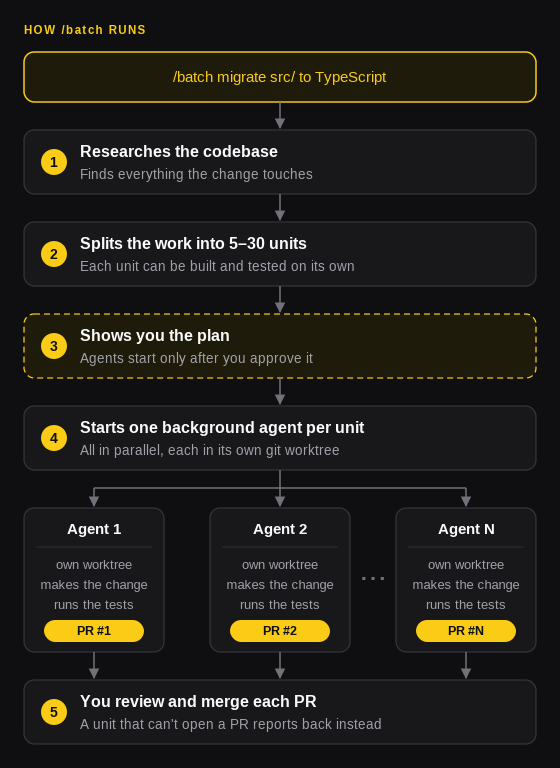
- Research. Claude explores the codebase to find everything the change touches.
- Split. It decomposes the work into 5 to 30 independent units.
- Plan. It shows you the plan. The agents start only after you approve it.
- Fan out. It starts one background subagent per unit, each in an isolated git worktree, so the agents can't trip over each other's edits or over your working copy. Each agent implements its unit, runs the tests, and opens a pull request. If it can't open one, it reports what happened instead.
- Review. You review and merge the pull requests one at a time. A unit that goes wrong doesn't hold up the rest.
What /batch needs
- A git repository, or a
WorktreeCreatehook that creates the worktrees for another version-control system. Outside git,/batchneeds Claude Code 2.1.281 or later; each agent then publishes its change with your project's own commands, and reports what it published when it can't open a pull request. - A way to open pull requests from your session. Check that Claude can
open a PR for you before you start (for GitHub that usually means an
authenticated
ghCLI). Otherwise every unit ends with a report instead of a PR. - Tests worth running. Every agent runs them, so they're how each unit proves it works.
Writing a good /batch instruction
The key word in the docs is independent. Each unit runs in its own worktree, by an agent that can't see what the others are doing. So the work has to split into pieces that can each be built, tested and merged on their own.
Good fits:
/batch migrate src/ from JavaScript to TypeScript
/batch replace moment with date-fns in every module under src/, keeping behaviour identical
/batch add a test file for every React component in src/components that has none
/batch convert the class components in src/ to function components with hooks
/batch upgrade each service in services/ to Node 22 and fix whatever breaks
Poor fits, and what to do instead:
- A change with a shared core. Renaming a type that everything imports
makes every unit depend on the same new definition. Make the core change
first in a normal session, merge it, then
/batchthe call sites. - Work that has to happen in order. Database migrations that must run in sequence don't parallelise.
- Small changes.
/batchplans for 5 to 30 units. For a handful of files, a normal session is faster than a plan, a fleet of agents and a stack of PRs.
The agents can't ask each other questions, so put everything they must agree on into the instruction: the scope, what "done" means, and what's off limits.
/batch migrate every route in src/routes/ from Express callbacks to async/await
handlers, one route file per unit. Keep request and response shapes identical,
keep the existing error middleware, and make sure npm test passes in each unit.
Don't touch src/routes/legacy/.
Before you approve the plan
The plan is your one checkpoint before as many as 30 agents start work, so read it properly.
Check the split. Does every unit really stand alone? Two units that edit the same file will conflict when you merge. If the split looks wrong, say so instead of approving.
Check the base branch.
/batchagents are subagents working in worktrees, and subagent worktrees branch from your repository's default branch on the remote (usuallymain), not from the branch you're on. Unpushed commits aren't in them. If the batch builds on work that isn't onmainyet, setworktree.baseRefto"head"in your settings:{ "worktree": { "baseRef": "head" } }Check your tests. A flaky test on
mainbecomes a flaky failure in twenty pull requests.Budget the review. Thirty units means thirty pull requests to read. That's the price of the speed.
A batch run means a lot of shell commands across a lot of agents. If permission prompts are slowing you down, my guide to Claude Code auto mode shows how to cut them without giving up the guardrails.
Afterwards, Claude Code removes the worktree of any agent that finished
without changes. Worktrees with changes stay on disk until a periodic sweep
can remove them without losing work, once they're older than your
cleanupPeriodDays setting.
Using /loop and /batch together
The two commands combine well: /batch opens a stack of pull requests, and
/loop keeps an eye on them while you review.
/batch migrate src/ from JavaScript to TypeScript

# ...approve the plan and let the agents run, then:

/loop 15m list the open PRs from this batch with their CI status, and summarise any new review comments
Keep a loop like this read-only. Fixing a pull request means switching to its branch, and a loop that checks out branches in your working copy will collide with whatever you're doing there. Let the loop tell you which PRs need you, then fix them deliberately.
Frequently asked questions
Does /loop keep running after I close the terminal?
No. Loops only fire while Claude Code is running. Run /background to
detach the session and keep it going, or use cloud tasks (/schedule) for
work that should run without your machine at all.
What's the shortest interval /loop supports?
One minute. The schedule is a cron expression and cron works in whole
minutes, so 30s becomes one minute.
How many agents does /batch start?
One per unit. Claude splits the work into 5 to 30 units, so a batch run starts between 5 and 30 background agents, each in its own worktree.
Can /batch run outside a git repository?
Yes, from version 2.1.281, as long as a WorktreeCreate hook creates the
worktrees.
Is /loop the same as a cron job?
It uses cron expressions, but the schedule lives in your Claude Code session, not in your system's crontab. It stops when the session ends and expires after 30 days. For durable schedules, use Desktop or cloud scheduled tasks.
Cheat sheet
/loop 5m <prompt>              run every 5 minutes (s, m, h, d; minimum 1 minute)
/loop <prompt> every 2 hours   the interval can trail the prompt
/loop <prompt>                 self-paced: Claude waits 1 minute to 1 hour between runs
/loop                          maintenance prompt, or .claude/loop.md
/loop 20m /review-pr 1234      run a skill on a schedule
/tasks                         list scheduled tasks and loop wakeups; x stops one
/background                    detach the session so its loops keep running
CLAUDE_CODE_DISABLE_CRON=1     turn scheduling off

/batch <instruction>           plan 5–30 units, then one agent, worktree and PR per unit
Checked against Claude Code 2.1.331 and the official documentation on 24 November 2026. Both commands change often, so the docs are the source of truth: Run prompts on a schedule, Commands, Worktrees and the changelog.